StackGP Demo#
This is a basic demo demonstrating how you can use StackGP to search for a model with a known form (\(x^2/y\)).
First we need to load in the necessary packages
import StackGP as sgp
import numpy as np
Define Function#
Here we define the function which we will try to rediscover.
#Define demo function to generate data
def demoFunc(x,y):
    return x**2/y
Data Generation#
Now we can generate some data that we will use in the search.
#Generate data
inputData=np.array([np.random.randint(1,10,10),np.random.randint(1,10,10)])
response=demoFunc(inputData[0],inputData[1])
GP Search#
Here we supply the input data and response to StackGP’s evolve function to search for a model that fits the data.
#Generate models
models=sgp.evolve(inputData,response)
Results#
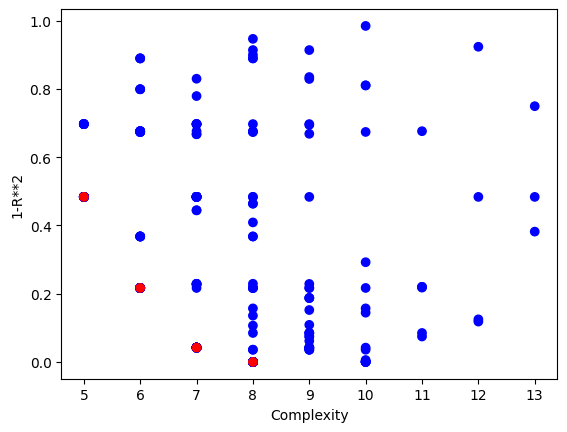
Now we can visualize the Pareto front plot of the evolved models to see how they perform with respect to accuracy and complexity.
#View model population quality
sgp.plotModels(models)
We can use the printGPModel function to print the best model in a readable format. We can see that the correct model form was found.
#View best model
sgp.printGPModel(models[0])
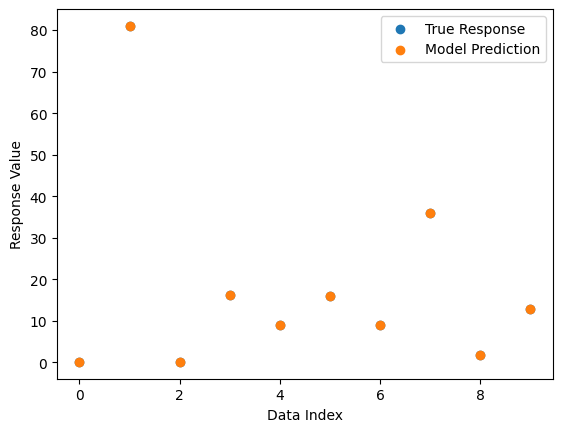
We can also plot a comparison between predicted and observed values. Since the model fits the data perfectly, we only see the predicted points in the plot since they cover the observed points.
#Compare best model prediction to true data
sgp.plotModelResponseComparison(models[0],inputData,response)
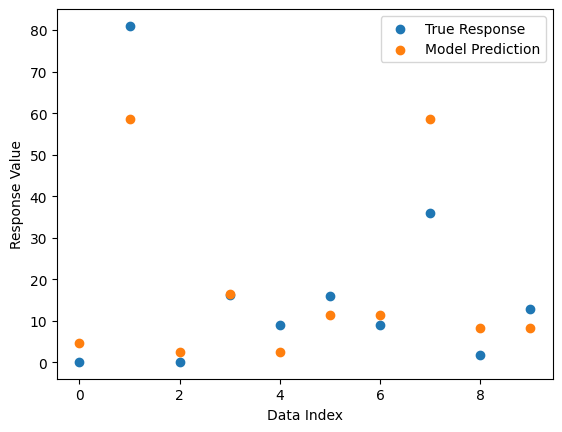
If we pick a low quality model from the population, we can see the difference.
#Compare another model to true data
sgp.plotModelResponseComparison(models[100],inputData,response)